More time for the work that matters
An AI assistant built for people who work with people. It handles first drafts, summaries, and analysis — so you can focus on the judgement, relationships, and decisions that only you can make.
Before
Two pages of meeting notes — bullet points, half-sentences, action items buried in the middle, a tangent about the parking lot…
After (5 minutes)
A clean board report: summary of discussion, key decisions, action items with owners and deadlines, financial overview. Ready to send.
The AI does the first draft. You do the thinking.
Your conversations are yours
Other users can't see what you write. As with any cloud tool, keep client names and personal details out of your conversations. How we handle your data
You can't break anything
Every conversation starts fresh. There are no wrong questions. If you don't like what you get, just try again.
Everything is a draft
The AI produces starting points, not final answers. You always review, edit, and decide what to use.
The 2-minute overview
1. Type a question
Use the message box at the bottom of the screen. Press Enter to send.
2. Pick an assistant
Click the name at the top to switch. Each one is built for a different kind of task.
3. Attach documents
Click the + button beside the message box, then choose Upload Files.
4. Load a helper
Type / for a saved prompt starter like board-report, or type $ for a skill like convening-experts.
That’s really it. Start with AI Guide if you’re new, then use the four lessons when you want screenshots and examples.
What you'll see
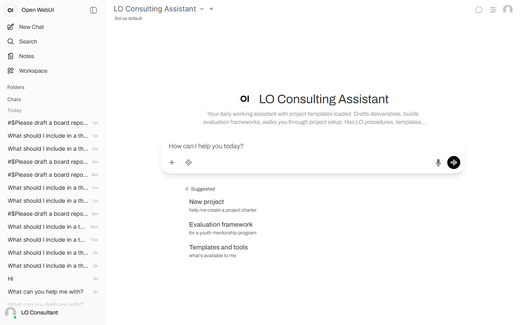
When you click the button below, the AI Guide will ask about your work. Just tell it what you do — it takes it from there.